Q: What is a UTM zone and why are they important?
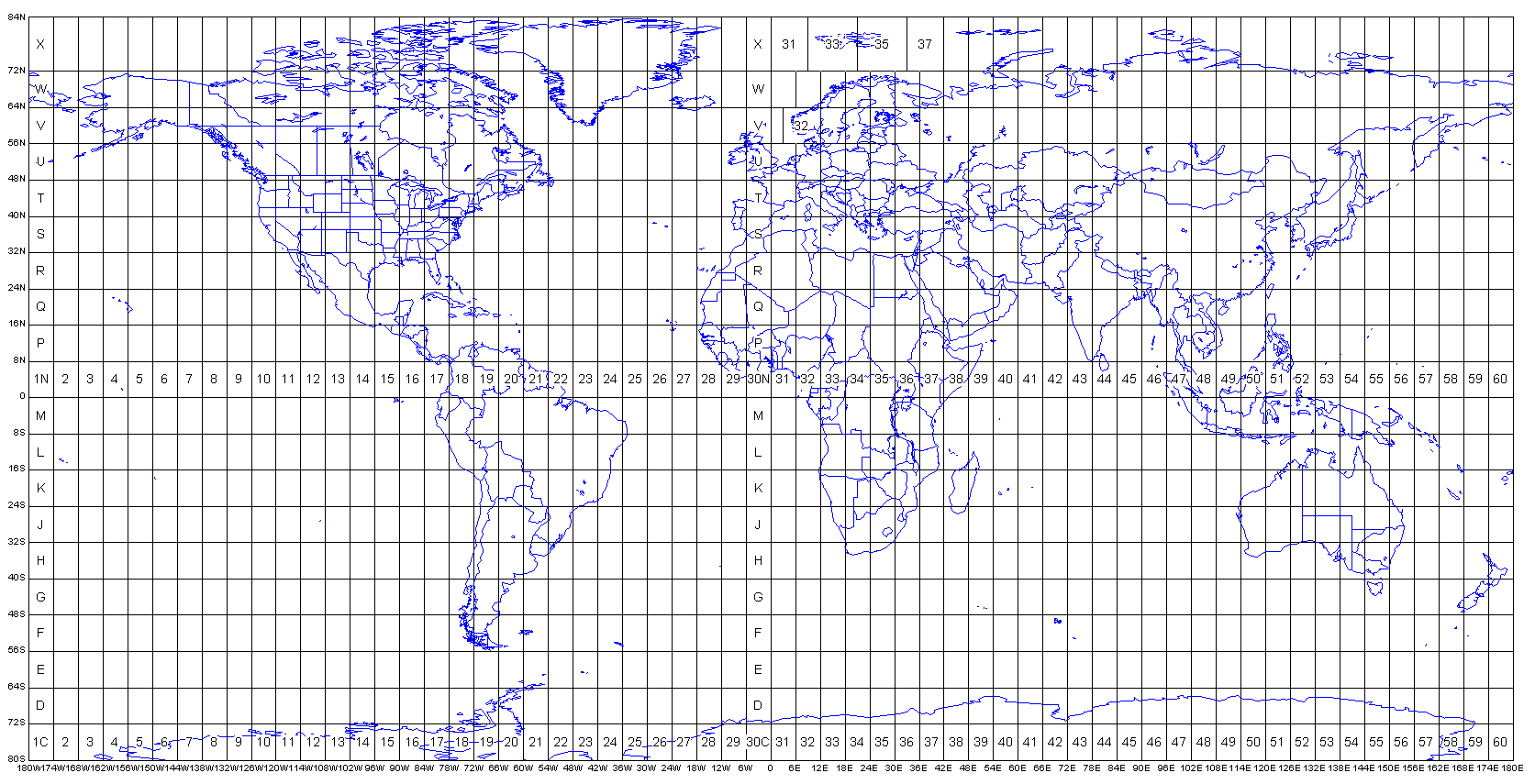
A: Universal Transverse Mercator (UTM) zones are standardized map projections that divide the Earth into 60 vertical strips,
each covering 6 degrees of longitude. UTM zones are crucial for accurate mapping, surveying, GPS navigation, and GIS applications
because they minimize distortion within each zone, providing highly accurate distance and area measurements for professional
mapping projects.
The horizontal lines (latitude) divide the earth in 10 vertical strips, 8 degrees each, from equator to the North and to the South. Letters are assigned to these strips
Q: How many UTM zones are there globally?
A: There are 120 total UTM zones worldwide – 60 zones in the Northern Hemisphere (designated with “N”) and 60 zones in the Southern Hemisphere (designated with “S”). Each zone spans 6 degrees of longitude, creating a comprehensive global grid system.
Q: What do the numbers and letters in UTM zones mean?
A: UTM zone designations use a number (1-60) followed by a letter (N or S). The number indicates the longitudinal zone (Zone 1 starts at 180°W, Zone 60 ends at 180°E), while the letter indicates the hemisphere (N = Northern, S = Southern). For example, “19N” refers to Zone 19 in the Northern Hemisphere.
Q: Which UTM zone should I use for my project?
A: Use the UTM zone that your project area falls within. Our UTM Zone Map helps you identify the correct zone by showing real-time coordinates and zone boundaries. Generally, you should use the zone that covers the majority of your project area to minimize distortion and ensure accuracy.
Q: How do I find a specific UTM zone on the map?
A: Use the search function in the control panel. Simply type the zone designation (e.g., “19N”, “18S”) and click “Search”. The map will automatically center on that zone and display relevant information. You can also manually navigate by panning and zooming to explore different regions.
Q: What information does each UTM zone pop-up display?
A: When you click on any UTM zone, a detailed pop-up appears showing:
Q: Why do I see “N/A” for some zone information?
A: “N/A” values may appear when the ArcGIS feature service is unavailable or when using the backup manual grid. The manual grid provides basic zone boundaries but may not include all detailed metadata like row designations or precise boundary values.
Q: How accurate are the coordinates shown in the bottom right corner?
A: The live coordinates display latitude and longitude to 5 decimal places (approximately 1-meter accuracy) and provide estimated UTM zone calculations. The UTM zone estimation is calculated mathematically based on longitude and is accurate for standard zone boundaries.
Q: Can I use this map for professional surveying projects?
A: This UTM Zone Map is excellent for zone identification, project planning, and educational purposes. For professional surveying requiring precise coordinates, always verify zone boundaries and coordinate values using official survey data and professional-grade GPS equipment.
Q: What coordinate system does the map use?
A: The base map uses the WGS84 geographic coordinate system (EPSG:4326) for global coverage. The UTM zones displayed follow standard UTM projection parameters with each zone using its respective EPSG code (e.g., EPSG:32619 for UTM Zone 19N).
Q: Why are there different base layer options?
A: Different base layers serve different purposes:
Q: How often is the UTM zone data updated?
A: UTM zone boundaries are mathematically defined and don’t change. However, the underlying ArcGIS feature service may receive updates for improved accuracy or additional metadata. Our application automatically uses the latest available data from ESRI’s authoritative sources.
Q: Does the map work offline?
A: No, this is a web-based application that requires an internet connection to load base maps and UTM zone data from online services. For offline UTM zone reference, consider downloading static UTM zone charts or using dedicated offline GIS software.
Q: What are the latitude limits for UTM zones?
A: Standard UTM zones extend from 80°S to 84°N latitude. Areas beyond these limits (polar regions) use different projection systems like Universal Polar Stereographic (UPS) for optimal accuracy in extreme latitudes.
Q: Why do some UTM zones appear to have irregular boundaries?
A: While most UTM zones follow the standard 6° longitude rule, some zones have been modified for practical reasons. For example, Norway uses extended Zone 32V and 33V to avoid splitting the country across multiple zones, and Svalbard uses modified zone boundaries.
Q: What’s the difference between UTM zones and MGRS grid squares?
A: UTM zones are the broad 6° longitude divisions, while MGRS (Military Grid Reference System) further subdivides UTM zones into smaller grid squares using a letter-number system. MGRS provides more precise location references within each UTM zone.
Q: Can I use UTM coordinates from one zone in a different zone?
A: No, UTM coordinates are only valid within their specific zone. Using coordinates from one zone in a different zone will result in significant positional errors. Always ensure your coordinates match the appropriate UTM zone for your area.
Q: The UTM zones aren’t displaying on the map. What should I do?
A: If UTM zones don’t appear:
Q: The coordinate display isn’t updating when I move my cursor. How do I fix this?
A: Ensure the “Show Coordinates” checkbox in the control panel is checked. If the issue persists, try refreshing the page or checking that JavaScript is enabled in your browser.
Q: Can I print or save the map view?
A: You can use your browser’s print function to print the current map view. For high-quality outputs or specific scales, consider using screenshot tools or professional GIS software for map production.
Q: The map is loading slowly. How can I improve performance?
A: Map loading speed depends on your internet connection and the complexity of the data being displayed. Try:
Q: Who maintains this UTM zone data?
A: The UTM zone boundaries and metadata are sourced from ESRI’s authoritative ArcGIS services, which maintain global geographic datasets used by mapping professionals worldwide. ESRI updates and maintains these datasets according to international mapping standards.